
Up-to-date releases standard
Using outdated package releases is a risk to your organization. Like deprecated packages, older releases are less likely to be patched. While the package itself may still be actively maintained, older releases usually have security vulnerabilities and other potentially harmful issues.
How can Tidelift help?
Section titled “How can Tidelift help?”The longer your organization waits to update to a newer release, the harder it may become as more changes are made to the package. With the Tidelift Subscription, you can keep outdated package releases out of your organization’s catalog by using the Up to date standard. Tidelift is regularly monitoring for package releases from the package manager. We will notify you when your team is using or wants to use outdated releases and help you uphold this standard.
How do I keep my team from using outdated releases?
Section titled “How do I keep my team from using outdated releases?”You can begin creating violations for outdated releases from the Catalog > Standards page and turning on the U****p to date standard.
What is considered outdated?
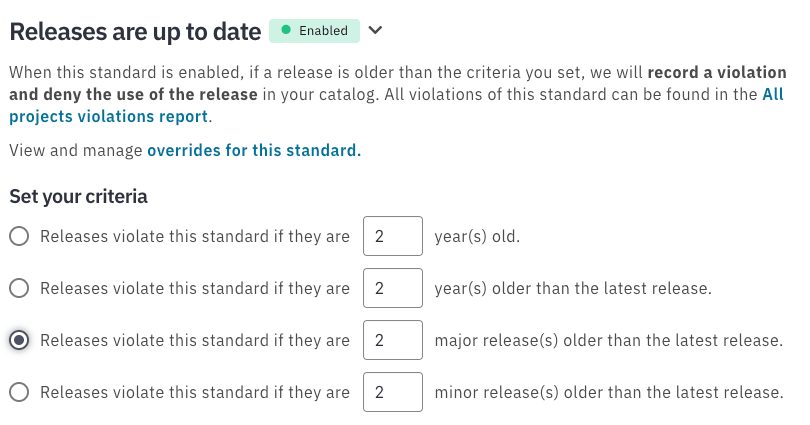
Section titled “What is considered outdated?”Tidelift offers a number of methods to determine whether a release is outdated. NOTE: only one method may be chosen for a catalog.
Absolute time evaluation
Section titled “Absolute time evaluation”The radio button labelled “Releases violate this standard if they are x year(s) old” uses the absolute age of the release to create violations.
For example, let’s say the date is 1 Sept 2024 and that you’ve configured the Up to date standard so that all releases older than 1 year old are not allowed. This means that any release published on or before 1 Sept 2023 is not allowed. This will create and record violations for versions 2.15.0 and 2.1.0 in the table below.
| Version | Release Date | Decision |
| 4.0.0 | 1 Apr 2024 | Allowed, published after 1 Sept 2023 |
| 3.7.4 | 1 Oct 2023 | Allowed, published after 1 Sept 2023 |
| 2.15.0 | 1 Aug 2023 | Not Allowed, published before 1 Sept 2023 |
| 2.1.0 | 1 Apr 2023 | Not Allowed, published before 1 Sept 2023 |
Relative time evaluation
Section titled “Relative time evaluation”The radio button labelled “Releases violate this standard if they are x year(s) older than the latest release” uses the relative age of a release (compared to the latest release) to create violations.
Let’s use an example. Suppose you set a default that all releases should be no more than 1 year older than the latest release. 2.0.0 is the latest release, but your projects are still using releases 1.5.0 and 1.0.0. In the example, Tidelift will alert you to update where you’re using version 1.0.0, but not 1.5.0.
| Version | Release Date | Decision |
| 2.0.0 | 1 Jan 2020 | Allowed, latest release |
| 1.5.0 | 1 Apr 2019 | Allowed, < 1 year older than the latest release |
| 1.0.0 | 1 Apr 2018 | Not Allowed, > 1 year older than the latest release |
Relative version evaluation
Section titled “Relative version evaluation”The radio buttons labelled “Releases violate this standard if they are x major/minor release(s) older than the latest release” creates violations by evaluating the difference in versions between a release and the latest release. The major/minor options determine which part of the version number is evaluated.
Major version
Section titled “Major version”For example, let’s say we want to deny all releases that are 2 major releases or more behind the latest release.
| Version | Decision |
| 17.3.0 | Allowed, latest release |
| 17.0.1 | Allowed, 0 major versions behind the latest release |
| 16.5.0 | Allowed, 1 major version behind the latest release |
| 16.0.1 | Allowed, 1 major version behind the latest release |
| 15.0.0 | Not Allowed, 2 major versions behind the latest release |
| 14.0.0 | Not Allowed, 3 major versions behind the latest release |
Minor version
Section titled “Minor version”In this example, we’ll deny all releases that are 3 minor versions or more behind the latest release. With this configuration, all releases with major versions different from the latest release are denied.
| Version | Decision |
| 7.9.3 | Allowed, latest release |
| 7.9.0 | Allowed, 0 minor versions behind the latest release |
| 7.8.0 | Allowed, 1 minor version behind the latest release |
| 7.7.0 | Allowed, 2 minor versions behind the latest release |
| 7.6.0 | Not Allowed, 3 minor versions behind the latest release |
| 6.2.3 | Not Allowed, 1 major version behind the latest release |
| 5.5.0 | Not Allowed, 2 major versions behind the latest release |
Which evaluation method should I choose?
Section titled “Which evaluation method should I choose?”Choose the mechanism that best matches your corporate policy, and helps your developers stay current on their dependencies.
Version-based
Section titled “Version-based”Version-based analysis is useful for ensuring your developers are close enough to the current release that continuing to stay up-to-date and applying new fixes is a simple process. The closer you are to the latest release in terms of major and minor releases, the smaller any needed upgrade or security patch will be, and the more likely you will be able to apply a fix without problems.
Tidelift recommends using version-based evaluation for most customers. To determine what may be an appropriate value to set, you may need to investigate how far behind the current release your projects generally are. This can be done by examining the Tidelift end-of-life Impact report, which uses the same calculation.
Time-based
Section titled “Time-based”Time-based analysis is useful for ensuring your developers are using software that has been recently maintained. Use time-based analysis when you want to avoid anything over a certain age. To determine what may be an appropriate value to set, you may need to investigate how old the releases used by your projects generally are. This can be done by examining the Tidelift end-of-life Impact report, which uses the same calculation.
How do I keep my team from using outdated releases?
Section titled “How do I keep my team from using outdated releases?”You can begin creating violations for outdated releases from the Catalog > Standards page and turning on the U****p to date standard.
What happens if a package release in my catalog becomes outdated?
Section titled “What happens if a package release in my catalog becomes outdated?”Tidelift is regularly monitoring all packages and will notify you if a package release that you are currently using becomes outdated by a newer release. A task will be generated for the catalog administrators to notify them about already-approved releases that violate this standard. For each package, the catalog administrators can resolve the violation by doing one of the following:
- Creating an override for the outdated package release
- Deny the specific release of the package and providing alternative releases to upgrade to
What happens when a newly requested package release is outdated?
Section titled “What happens when a newly requested package release is outdated?”If a developer requests a package release that Tidelift knows to be outdated, the catalog administrators reviewing the request will see that there is a standard violation. The catalog administrators can do any of the following:
- Create an override for the package release and approve the release
- Deny the release
Managing overrides
Section titled “Managing overrides”You may want to allow something that the up-to-date releases standard has not allowed. For example, it could be an legacy project inside your organization where there are no upgrades planned.
To do so, see Policy Overrides.